

It is one of the most maddening experiences in digital marketing. You log into your Google Business Profile (GBP) to make a small update. You could be changing your closing time, correcting a typo in your firm’s name, or adding “Wrongful Death” to your service list.
After you perform the change and click save, Google tells you the edit is pending. You wait ten minutes. You refresh the page.
And there it is: The old information.

For a law firm, this isn’t just a technical glitch. It’s a liability. If a client shows up to your office at 5:30 PM because Google said you were open, and they find a locked door, you haven’t just lost a lead. You’ve damaged your reputation. And that’s jsut for a minor error. If your phone number, address, or website url are wrong, your GBP is actively misleading users and losing you clients.
Why does this happen? Why does Google, one of the most sophisticated technology companies in the world, struggle to let you update your own business listing?
The answer lies in understanding that you do not own your Google Business Profile. You merely manage it. And right now, Google doesn’t trust you. This is your comprehensive guide to understanding the ghost edit phenomenon, the ecosystem of data trust, and how to finally force Google to accept your changes.
The Nanny Algorithm: Why Google Doubts You
To fix the problem, you have to understand the machine’s motivation. Google’s primary product is trust. Users rely on Google Maps to be accurate. If Google Maps sends people to closed businesses or fake law firms, users stop using it.
Because of this, Google has built a nanny algorithm, a rigorous and skeptical system that verifies every single edit made to a Business Profile.
When you hit save, Google doesn’t just write that data to the server. It runs a rapid, complex cross-reference check. It asks three questions:
- Does this match what we know? (Historical data).
- Does this match what others say? (Third-party citations).
- Is this behavior suspicious? (Spam filters).
Depending on the answers to these questions, the nanny algorithm may block the edit. It reverts to the safest known version of the truth.
For law firms, this is particularly aggressive because the legal vertical is labeled as YMYL (Your Money, Your Life). Google holds law firms to a much higher standard of data accuracy than it does a pizza shop. The threshold for rejection is lower, and the scrutiny is higher.
Read More: How to Manage Business Profiles on Bing, Apple, and Yahoo
The 4 Hidden Culprits Behind Rejected Edits
If your edits aren’t saving, it is rarely a glitch. It is almost always a data conflict. Here are the four most common reasons Google is overruling you.
1. The “Data Ecosystem” Conflict
This is the most common cause. Google does not rely solely on the information you provide. It scrapes data from thousands of other sources across the web—YellowPages, Yelp, Avvo, Justia, Facebook, the Better Business Bureau, and even your own website’s footer.
Imagine you try to change your phone number on Google to a new tracking number.
- You say: 555-0199.
- Yelp says: 555-0100.
- Your Website Footer says: 555-0100.
- The State Bar Directory says: 555-0100.
Google looks at this and says, “The business owner is entering 555-0199, but the entire rest of the internet agrees it is 555-0100. The owner must have made a typo.” Reject.
The Fix: You cannot change your data on Google in a vacuum. You must conduct a citation audit. Before you try to change your address or hours on Google, you must ensure that data is already updated on your website and major legal directories. You have to create a consensus that gives Google permission to trust the new input.
2. The Hard Lock on Core Data
Google puts a hard lock on specific fields that are prone to spam. The biggest one for law firms is the business name.
Years ago, lawyers realized they could rank better if they stuffed keywords into their name. Instead of “Smith Law,” they named themselves “Smith Law: Best Car Accident Lawyer Chicago.” Google hated this.
Now, if you try to change your business name, even legitimately, Google’s spam filters freak out. If you rebrand from “Smith Law” to “Smith & Jones Law,” Google might reject it because it suspects you are selling the profile or hijacking a listing.
The Fix: If you are rebranding, you often need to provide visual proof before the edit will stick. This means uploading a photo of your new office signage or a business license to the photos section of your profile before attempting the name change. You are giving the nanny algorithm visual evidence to support the text edit.
3. The Office Sharing Nightmare
This is somewhat unique to the legal industry. Lawyers love to share office space. You might share a suite with three other solo practitioners. Google hates this.
If 10 different law firms all list “123 Main Street, Suite 100” as their address, Google’s algorithm flags the location. It stops trusting any edits from that location. If you try to change your hours, Google might reject it because it can’t distinguish your firm from the guy down the hall.
The Fix: You must have a unique suite number. If that isn’t possible, you need to ensure your service area settings are distinct, and your primary categories are different from your suitemate’s.
4. The User Suggestion Override
Sometimes, the call is coming from inside the house. Or rather, from your competitors.
You don’t own your profile as much as you think you do. Google crowdsources its data via suggest an edit. This means a random user, or a calculating rival, can submit a change claiming you are permanently closed. When Google’s bot accepts it, your digital lights go out.
If a local guide (a trusted Google user) suggests an edit, Google might accept it over yours. If you change your hours to open 24 hours, and a user suggests that you are closed at 5 PM, Google might revert your edit because it believes the user’s real-world experience over your dashboard claim.
The “Cooling Off” Protocol: What to Do When You’re Stuck
If you are currently in a battle with Google, you change it, they revert it, you change it again, then you need to stop.
Stop acting like a script. When you mash the save button, you fit the profile of a spammer perfectly. This triggers the platform’s most aggressive defense: the hard suspension. You are risking the total deletion of your profile over a few extra clicks.
Step 1: Walk Away for 72 Hours. Do not touch the profile. Let the cache clear, and the flags settle.
Step 2: Fix the Website First. Go to your firm’s website. Is the data exactly identical to what you are trying to put on Google? Check the footer, the contact page, and the schema markup. Google crawls your site to verify your GBP. If they don’t match, you lose.
Step 3: Check the knowledge graph sources. Go to Avvo, Justia, and Yelp. Update the data there first. Wait a few days for Google to crawl those sites.
Step 4: Try One Edit at a Time. Do not try to change your Name, Address, Phone, Website, and Category all at once. That looks like a profile hijacking. Change one thing. Wait for it to be approved (which can take up to 3 days). Then change the next thing.
The Nuclear Option: Contacting Support
If you have done all the above and your edits are still stuck in pending or not approved, you have to go to Google Business Profile Support.
Warning: This is painful.
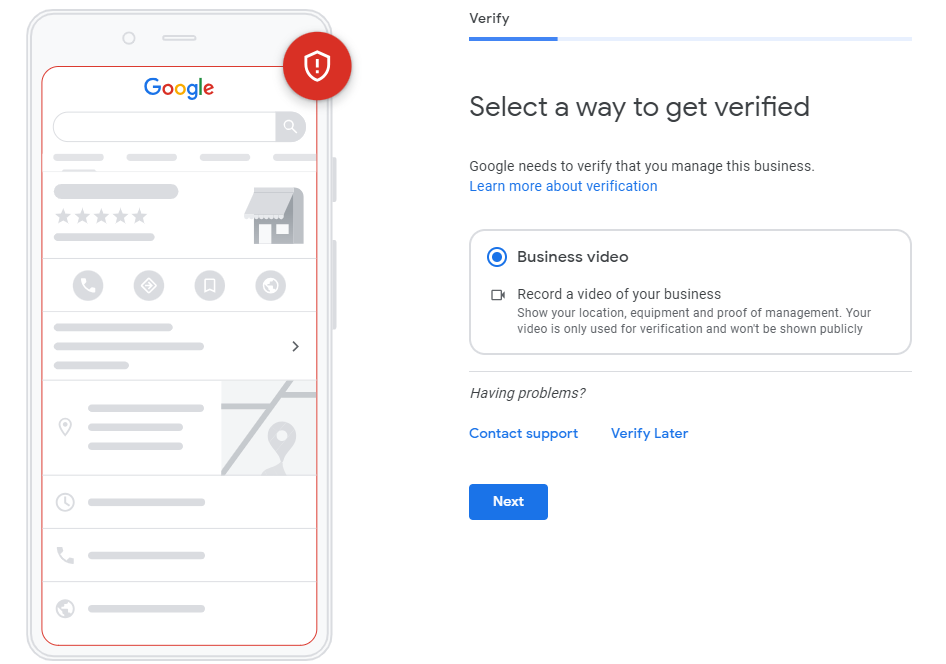
When you contact support, do not just say it’s not working. You need to provide proof of life whihc may involve re-verification.
- Take a video on your phone. Start at the street sign. Walk into your building. Walk into your office. Show your logo on the wall. Unlock the door with your key.
- Have a utility bill ready that shows the firm’s name and the exact address you are trying to use.
Google Support agents are often contractors working from a script. They need physical evidence to override the algorithm.
Explaining Common Search Console Errors
Control What You Can
The ghost edit phenomenon is a reminder that in the world of digital marketing, you are playing in Google’s sandbox. They make the rules, and they own the data.
But you are not helpless. By understanding that Google craves consistency and consensus, you can build a digital footprint that the algorithm trusts implicitly.
At Civille, we don’t just build websites. We manage your entire digital entity. We ensure that your data is consistent across the ecosystem so that when we make an edit, Google listens. If you’re tired of fighting with a robot about your own business hours, it’s time to talk to Civille.